Security
Security in Mind One protects master data at every layer: authentication, authorization, transmission and storage.
Authentication
Available methods
| Method | Description |
|---|---|
| Email + password | Credentials managed by Mind One with JWT (2h access token + 7d refresh token) |
| OAuth — Google | Authentication delegated to Google |
| OAuth — Azure AD | Authentication delegated to Microsoft Azure AD |
JWT tokens
Mind One uses JWT tokens for authentication:
- Access token: valid for 2 hours. Sent with every request.
- Refresh token: valid for 7 days. Lets you get a new access token without re-authenticating.
- Tokens renew automatically while the user is active.
Password recovery
- The user requests a reset from the login screen.
- They receive an email with a tokenized link.
- They set a new password.
Access control (RBAC)
The access control model is based on roles with predefined permissions. Each user has a role per tenant that determines what actions they can perform.
Principles
- Least privilege: each user gets only the permissions they need.
- Tenant isolation: a tenant’s data is invisible to users of other tenants.
- Resource-based permissions: permissions are evaluated by resource type (workspaces, sheets, etc.) and action (view, create, edit, delete).
- Row Level Security (RLS): permissions can be applied at the record level, restricting which specific records a user can see or edit within a sheet based on their role or identity attributes.
Permission evaluation
When a user attempts an action:
- Their role in the current tenant is identified.
- The role’s permissions for the requested resource and action are checked.
- If the permission exists, the operation is allowed. If not, it’s denied.
Workspace security inheritance
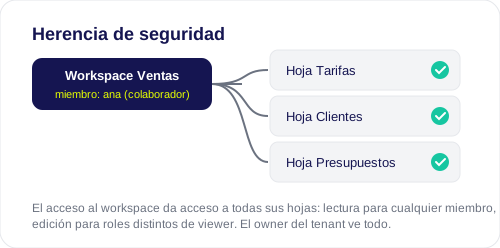
Access to sheets inherits the workspace’s security (July 2026):
- A user assigned to a workspace sees all the sheets in that workspace: read access for any member and edit access for workspace roles other than viewer.
- Admin and Modeller see every workspace and sheet in the tenant.
- The tenant owner sees and accesses everything, even if their global role isn’t an administrative one.
- Direct per-sheet and per-group permissions keep working as additional access paths.
- A workspace with no assigned members is invisible to non-admin users.
Encryption
In transit
All communications happen over HTTPS/TLS. This includes:
- Access to the web interface.
- API calls.
- WebSocket communication for realtime.
- OAuth authentication.
At rest
Sensitive data is encrypted at rest:
- Data warehouse connection credentials.
- API tokens.
- Integration data.
The encryption key is configured via the ENCRYPTION_KEY variable.
Multi-tenant isolation
Each tenant operates completely isolated:
- One tenant’s data isn’t accessible from another.
- Users only see the resources of the active tenant.
- Database queries include automatic tenant filters.
- Switching tenants requires re-authenticating the context.
Backup and disaster recovery policy
Backup
- Frequency: automatic backups on a daily basis.
- Retention: backups are kept for a minimum of 30 days.
- Scope: all tenant data is included — workspaces, sheets, value lists, connections, users and configuration.
- Storage: backups are stored in a geographic location different from the production data.
- Verification: backups are automatically verified to guarantee their integrity and recoverability.
Disaster Recovery (DRP)
- RTO (Recovery Time Objective): the maximum estimated time to restore service after a serious incident.
- RPO (Recovery Point Objective): the maximum acceptable data loss, determined by the backup frequency.
- Automatic failover: if the primary infrastructure fails, the system automatically redirects traffic to the backup infrastructure.
- Recovery environments: Mind One maintains recovery environments in separate geographic regions to guarantee service continuity in the face of regional disasters.
- Periodic testing: recovery procedures are tested regularly to verify that recovery times and data meet the defined objectives.
To get the exact RTO and RPO values applicable to your plan, contact the Mind team at support@wearemind.io.
Rate limiting
The API applies global throttling of 100 requests per minute per user to prevent abuse.
Best practices
- Limit administrators: keep the minimum necessary number of users with the Admin role.
- Use OAuth when possible: centralize authentication with your corporate identity provider.
- Review access periodically: deactivate users who no longer need access.
- Protect API keys: don’t share API keys in public repositories. Revoke them if compromised.
- Use strong passwords: at least 8 characters combining different character types.
Related
- Users and Roles — Managing roles and permissions.
- Configuration — API keys and tenant configuration.
- Access and Login — Authentication methods.